So what’s the deal with AI in Google Ads anyway
Google Ads AI tools are software that use artificial intelligence to automate and improve your advertising campaigns. This means a computer handles the repetitive work—like writing ad copy, adjusting bids, and finding the right audience—so you can focus on strategy instead of spreadsheets.
Running Google Ads manually is exhausting. You’re constantly tweaking bids, testing headlines, and trying to figure out which keywords are burning your budget. AI tools take over that heavy lifting, using data to make decisions faster and more accurately than you could on your own.
The goal isn’t to replace you. It’s to give you a copilot that never sleeps and constantly looks for ways to make your campaigns perform better. Think of it as getting the grunt work off your plate so you can actually think about the big picture.
Here’s what these tools actually do for you:
- Analyze performance data: They look at thousands of data points in real time to spot patterns you’d never catch in a spreadsheet.
- Make adjustments automatically: They shift budgets, change bids, and pause underperforming ads without you lifting a finger.
- Test at scale: They can run hundreds of experiments simultaneously while you’re doing literally anything else.
Why you should actually care about AI for your Google Ads
You hear “AI” thrown around so much it’s basically lost all meaning. But when it comes to your Google Ads, there are real, tangible reasons to pay attention. It boils down to saving time, saving money, and getting better results.
The automation aspect is huge, with 98% of B2B marketers saying automation is critical to success. Instead of spending Monday morning manually adjusting bids for a hundred different ad groups, an AI tool does it for you based on the performance goals you set.
It also helps you stop guessing. AI can process way more information than you could ever handle in a spreadsheet. This means it spots trends and opportunities you’d miss, like shifting budget to a surprisingly high-performing audience or cutting spend on an ad that gets clicks but zero real conversions.
The result is less wasted ad spend and a better return on your investment, with firms using AI achieving 20-30% higher ROI on their marketing campaigns compared to their peers. You’re not just working harder—you’re working smarter because the machine is handling the tedious optimization work while you focus on what actually moves the needle for your business.
How AI tools help with Google Ads
AI isn’t some single magic button you press to make everything better. It’s a collection of different technologies that tackle specific, often annoying, parts of running paid campaigns. Here’s what AI can actually take off your plate.
Automating campaign experiments
Running experiments is the only way to really know what works. But manually setting up A/B tests for different audiences, ad copy, and landing pages is a massive time sink. You might only get to run a handful of tests each month, which means you’re learning slowly and leaving money on the table.
AI platforms can run thousands of these experiments at the same time. They automatically create variations, allocate a small portion of your budget to each one, and measure the results. The system then learns from what works and shifts more budget toward the winning combinations, all without you building a single pivot table.
This is how you test faster and learn faster. Instead of waiting weeks to see if your new headline performs better, the AI figures it out in days and automatically doubles down on what’s working. You get better results without the manual labor.
Generating ad creative
Staring at a blank page trying to write another headline for a responsive search ad is a special kind of pain. AI can help you break through writer’s block and generate dozens of different ad copy variations in seconds. You give it a URL or a product description, and it spits out headlines and descriptions for you to test.
This isn’t about letting a robot write all your copy. It’s about generating ideas and variations at a scale you couldn’t achieve on your own. You can then edit, refine, and test these AI-generated suggestions to find what resonates most with your audience.
A google ad copy generator is particularly useful when you need to create multiple versions for different personas or campaigns. Instead of spending an hour writing five variations, you spend ten minutes reviewing and tweaking twenty variations the AI created. That’s a better use of your time.
Finding your actual buyers
For B2B marketers, this is probably the biggest headache with Google Ads. The platform’s built-in targeting is broad and designed more for B2C. You know your ideal customer isn’t just “people interested in business software.” They’re VPs of Engineering at Series C fintech companies with over 500 employees using AWS.
This is where AI platforms built for B2B really shine. They can connect to your CRM and third-party data sources to build hyper-specific audiences based on firmographics, technographics, and intent signals. You can then target these exact accounts and personas on Google Search and Display, ensuring your ads are only shown to people who can actually buy your product.
Here’s what better targeting looks like in practice:
- You upload a list of your ideal customer profile from your CRM
- The AI matches those companies and finds similar accounts based on their characteristics
- It identifies decision-makers at those companies and targets them specifically
- Your ads only run for people who fit your ICP, not random clicks from unqualified traffic
This means you stop wasting budget on clicks from people who will never convert. Your cost per qualified lead drops because you’re only paying for the right eyeballs.
Adjusting your bids and budgets
Bid management is a classic use case for AI in paid search. Instead of manually setting your cost-per-click for every keyword, AI-driven ad optimization does it for you. It analyzes factors like time of day, device, location, and user behavior to predict the likelihood of a click leading to a conversion.
It then adjusts your bids in real time to be more competitive for high-value clicks and pulls back on less promising ones. This automated process helps you get the most out of your budget, ensuring your money is spent where it has the highest chance of driving results.
The best part is that it never stops working. While you’re asleep, the AI is still monitoring performance and making adjustments. By the time you check your campaigns in the morning, it’s already shifted budget away from what’s not working and doubled down on what is.
Google’s built in AI vs third party platforms
You don’t have to buy a separate tool to use AI in Google Ads. Google has been building its own artificial intelligence features directly into the platform for years. The big question is whether their built-in tools are enough, or if you need something more.
The pros and cons of Google’s native AI
Google’s native AI, like Performance Max and Smart Bidding strategies, is convenient and free to use. It has access to an unparalleled amount of search data and user signals that no third-party tool can match. For simple B2C campaigns with straightforward conversion goals, it can often work quite well.
The downside is that it’s a “black box.” Google gives you very little control or transparency into how its AI is making decisions. You feed it assets and a budget, and it does its thing, but you don’t get much data back on what audiences, placements, or creative are actually working.
For B2B marketers who need to prove ROI and target specific accounts, this lack of control is a dealbreaker. You can’t tell your CMO “Google’s AI is handling it” when they ask why you spent $50K last month and only got three qualified leads. You need to see what’s working and what’s not so you can make informed decisions.
Here’s the reality of Google’s native AI:
- Performance Max: Great for e-commerce, frustrating for B2B because you can’t control where your ads show up or who sees them.
- Smart Bidding: Works well if you have a lot of conversion data, but it optimizes for Google’s definition of success, not necessarily yours.
- Responsive Search Ads: Automatically tests different headline and description combinations, but you still need to write all the variations yourself.
When to choose a third party AI platform
You should consider a third-party AI platform when Google’s native tools aren’t meeting your business needs. If you’re a B2B company struggling to target your ICP, a third-party tool with better audience-building capabilities is a no-brainer. It allows you to use your own first-party data to reach the right people, not just whoever Google thinks might be interested.
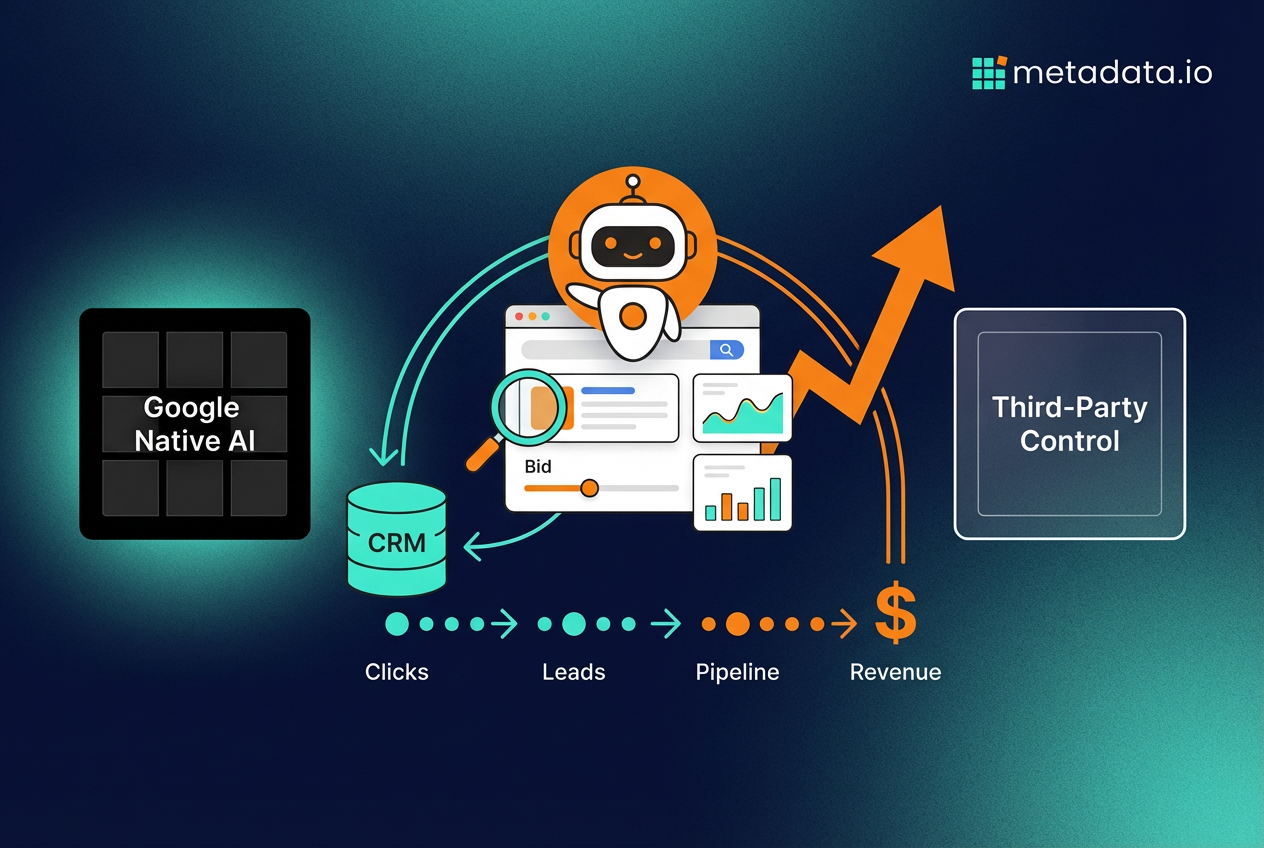
You also need a third-party platform when your primary goal is generating qualified pipeline and revenue, not just leads. These platforms integrate directly with your CRM, allowing them to see what happens after the click. This means the AI can optimize your campaigns for what truly matters—meetings booked and deals closed—instead of just cheap form fills that sales ignores.
The trade-off is that you’ll pay for the platform. But if it helps you stop wasting half your budget on unqualified traffic, it pays for itself pretty quickly. You’re essentially choosing between convenience and control, between optimizing for Google’s metrics and optimizing for your business outcomes.
| Google’s Native AI | Third-Party AI Platforms |
|---|---|
| Free to use | Requires a subscription |
| Easy to set up | Can have a learning curve |
| Access to massive Google data | Connects to your CRM for revenue data |
| “Black box” with little transparency | Granular control and transparency |
| Limited B2B targeting options | B2B-specific targeting capabilities |
| Optimizes for clicks and conversions | Optimizes for pipeline and revenue |
Go beyond clicks and connect AI to revenue
The biggest mistake marketers make with AI is using it to get better at chasing the wrong metrics. Getting a lower CPC or a higher CTR is nice, but it doesn’t pay the bills. The real value of a sophisticated artificial intelligence ads platform is its ability to connect your ad spend directly to revenue.
Stop optimizing for vanity metrics
For years, marketers have been judged on metrics like clicks, impressions, and cost-per-lead. These are easy to measure but often have little to do with business impact, with analysis showing 30-40% of PPC budget wasted on keywords that convert but never close. A campaign that generates 1,000 cheap leads is a failure if none of them are qualified and sales refuses to call them.
A true AI marketing platform moves beyond these vanity metrics. By integrating with your sales and marketing automation systems, it can see which campaigns, ads, and audiences are actually producing qualified opportunities and customers. This allows you to stop optimizing for top-of-funnel activity and start optimizing for bottom-line results.
Think about it this way: would you rather have 100 leads at $50 each or 10 leads at $500 each if the second group is ten times more likely to close? The math is obvious, but most AI tools can’t see that far down the funnel. They just see “more leads equals better” and optimize accordingly.
Tie your ad spend directly to pipeline
Imagine knowing that for every dollar you put into a specific Google Ads campaign, you get ten dollars back in qualified sales pipeline. That’s the level of clarity you should be aiming for. When your AI platform is connected to your CRM, this becomes possible.
You can see the entire customer journey, from their first ad click to the final sale. This allows the AI to make smarter decisions, like shifting budget away from a campaign that drives lots of cheap leads to one that drives fewer, but much more valuable, sales opportunities. This is how you prove the value of your marketing spend to your CFO.
The key is having an AI platform that can track and optimize for these down-funnel metrics. It needs to know which leads became opportunities, which opportunities became customers, and how much revenue each campaign actually generated. Without that visibility, you’re still just guessing.
Let AI agents run your campaigns
The most advanced platforms use what are called AI agents. These are autonomous systems that work around the clock to manage and optimize your campaigns based on the business goals you set. You don’t just tell it to get more clicks—you tell it to reduce your customer acquisition cost or increase your marketing-generated pipeline.
These google ads ai agents then handle the execution. They run thousands of experiments, adjust bids, reallocate budgets between channels, and refine audiences, all in service of hitting your number. It’s like having a team of dedicated PPC experts working for you 24/7, ensuring your budget is always being spent in the most efficient way possible to generate revenue.
Here’s what that actually looks like in practice:
- Morning: The AI notices that one audience segment is converting at twice the rate of others and automatically shifts 30% more budget to it.
- Afternoon: It sees that a specific ad creative is driving high-quality leads and creates three new variations to test against it.
- Evening: It identifies that your cost per opportunity is creeping up on one campaign and pauses the underperforming ad groups.
- Night: While you’re asleep, it continues monitoring performance and making micro-adjustments to bids based on real-time conversion data.
This is the future of AI in paid search. You set the strategy and the goals, and the AI handles the execution. You’re not babysitting campaigns anymore—you’re directing them. And when you’re ready to see how a true revenue-focused platform works, you can always book a demo to see it in action.